
Why I Built an Expense Tracker
I know. Every developer's first app is a to-do list or expense tracker.
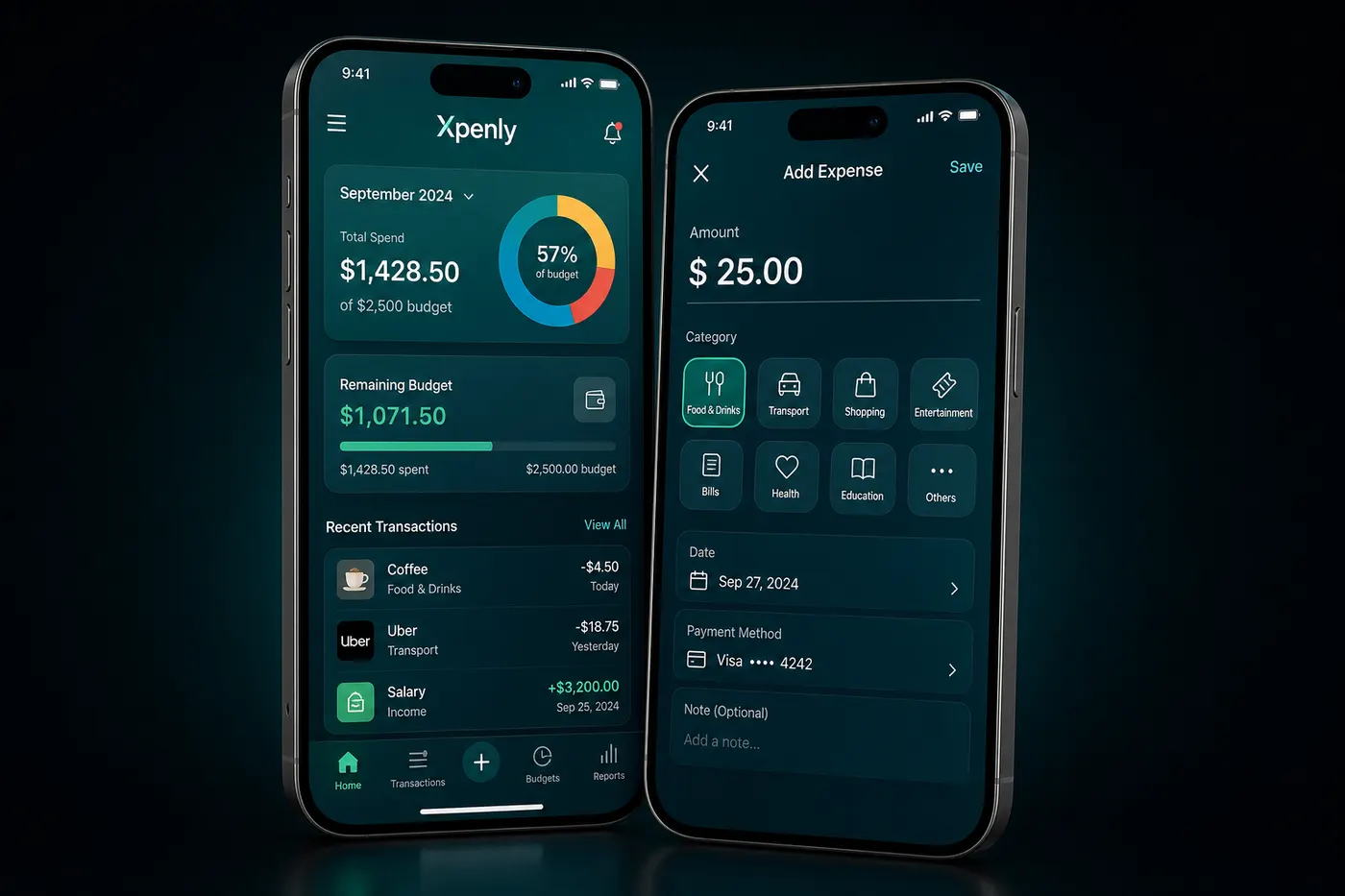
But I had a specific problem: existing apps were either too simple (no insights) or too bloated (15 screens before you can add a transaction). I wanted something that opened fast, logged an expense in two taps, and showed me meaningful patterns.
That became Xpenly — now live on the App Store.
The Tech Stack
Framework:   Expo (managed workflow)
Language:    TypeScript
State:       Redux Toolkit + RTK Query
Charts:      Victory Native
Backend:     Supabase (PostgreSQL + Auth)
Storage:     AsyncStorage (local-first)
Build:       EAS Build + EAS Submit
Architecture: Local-First
The defining architectural decision was local-first. Transactions are stored in AsyncStorage immediately when added. Supabase sync happens in the background.
This means:
- The app feels instant — no loading spinners to log a transaction
- Works offline completely
- Sync conflicts are resolved with last-write-wins (acceptable for personal finance)
// Add transaction: optimistic local write → background sync
async function addTransaction(tx) {
  // Step 1: Write to local store immediately
  dispatch(transactionsSlice.actions.addLocal(tx));

  // Step 2: Sync to Supabase in background (non-blocking)
  syncToSupabase(tx).catch((err) => {
    // Mark as pending sync — retry on next app open
    dispatch(transactionsSlice.actions.markPendingSync(tx.id));
  });
}
The Hardest Part: Recurring Transactions
Recurring transactions sound simple: "Every month on the 15th, add -$50 for gym membership."
Edge cases that almost broke me:
- What if the user doesn't open the app for 3 months? Generate all 3 missed instances.
- What if the recurrence day is the 31st and the month has 28 days? Clamp to last day of month.
- What if the user edits the amount mid-series? Apply only to future instances.
function generateMissedOccurrences(recurring, lastGeneratedDate, today) {
  const occurrences = [];
  let current = nextOccurrence(lastGeneratedDate, recurring.frequency);

  while (current <= today) {
    occurrences.push({
      ...recurring,
      id: uuid(),
      date: clampToMonthEnd(current, recurring.dayOfMonth),
      isGenerated: true,
    });
    current = nextOccurrence(current, recurring.frequency);
  }

  return occurrences;
}
This runs on every app launch to catch up missed recurring transactions.
Publishing to the App Store: Step by Step
Step 1: Apple Developer Account $99/year. Create your App ID in App Store Connect. Enable the capabilities you need (if any).
Step 2: EAS Build
npm install -g eas-cli
eas login
eas build:configure
eas build --platform ios --profile production
EAS handles code signing, provisioning profiles, and certificates automatically. No Xcode required.
Step 3: Screenshots Apple requires screenshots in exact dimensions for each device class. I used a screenshot generator template (Sketch) to produce all required sizes from one design.
Step 4: Privacy Policy Required for any app. I hosted a simple HTML page on Vercel.
Step 5: EAS Submit
eas submit --platform ios --latest
Uploads the build directly to App Store Connect. Then in ASC: add screenshots, set age rating, set pricing (free), submit for review.
Review time: 24 hours for initial review, approved on the first try.
3 Things I Wish I'd Known
1. Screenshot dimensions are strict and unintuitive Apple's screenshot requirements are for specific device dimensions that don't match common phone sizes exactly. Use a tool, don't screenshot manually.
2. TestFlight beta is mandatory for finding real-world bugs I ran a 2-week TestFlight beta with 15 friends. Found 3 bugs I never would have caught in the simulator (keyboard overlapping input on iPhone SE, recurring transactions not generating on first launch after install, RTK Query cache not invalidating on Supabase sync error).
3. The privacy policy URL must work before you submit App Store review will reject your app if the privacy policy URL returns a 404. I learned this the hard way (not on Xpenly, but a friend's app).
What's Next for Xpenly
- Budget goals with progress rings
- Receipt photo scanning with GPT-4 Vision
- iCloud sync as an alternative to Supabase
Download Xpenly on the App Store or see my full portfolio: buildbysandeep.dev